Why I write a weekly update before anyone asks
Reading time: 4 min, last updated: May 2026
What you will find here:
- Every Friday, I spend 15 minutes writing down what I accomplished, where I got stuck, and what is next. The format is called PPP (Progress, Plans, Problems), and the rolling document doubles as annual review preparation.
- The plans from last week either become progress or a challenge. That loop is the closest thing I have found to an honest weekly check on whether I am working on the right priorities.
- The update makes my work visible without extra meetings or overhead. I share it with my boss when it feels right. Google, Skype, and Palantir run similar systems at organizational scale, but the point here is that you can start it alone, without anyone's buy-in.
A few months into a new role, my VP caught me in a Teams call. Casual check-in, nothing formal. “So, how’s it going?”
I stammered. Something vague about projects being “on track.” The call moved on. Twenty minutes later, three concrete things came to mind that I should have said. A recruitment pipeline that was moving faster than expected. A budget approval we had just landed. A cross-functional blocker that needed attention from someone above me.
I had done good work that week. Under a little bit of pressure, none of it came to mind.
Why good work stays invisible in large organizations
Your boss has 6 other direct reports, 14 meetings today, and a quarterly review to prepare. Your boss’s boss has even less bandwidth. Nobody is paying close attention to what you accomplish on a random Tuesday. That is how organizations with hundreds of people work.
If you are someone who puts their head down and does the work, that creates a specific problem. The work gets done. Nobody sees it. And you are probably not the type who walks around announcing wins in the hallway. I am the same way. I spent years doing solid work that barely registered on anyone’s radar, because good output needs someone to make it visible. Especially in a company where everyone is buried in their own priorities.
A weekly update fixes this without requiring you to perform.
How to write a weekly update in 15 minutes
I picked this up at a startup I worked at years ago. The team did weekly updates together: what we accomplished, where we got stuck, what was next. When I left that company, I kept doing it on my own. That was several years ago. I still do it every Friday.
I open a Word document. The same one every week. It has three sections: Progress, Challenges, Plans. The whole thing takes about 15 minutes.
Progress is what I accomplished this week. Short sentences, plain language. “Recruiting: two candidates in the pipeline. Three interviews conducted, one moved to final round.” Or: “Finance alignment meeting completed. Project approved to continue as proposed.” Five to ten sentences, depending on the week.
Challenges is where things are stuck or where I need input. “Still waiting on legal review for the vendor contract. Two weeks overdue, might need escalation.” This section is sometimes empty. That is fine.
Plans is what I intend to work on next week. And here is where the format earns its keep: the plans from last week either become progress (I did the thing) or they become a challenge (I got stuck). That loop, week after week, is the closest thing I have found to an honest check on whether I am working on the right things or just reacting to whatever lands in my inbox.
The document is rolling. I do not start a new file every week. I add to the same one. After a year, I have roughly 45 entries in a single document (not 52, because holidays exist). When my annual review comes around, preparation takes 30 minutes instead of a painful afternoon of trying to remember what I did in March.
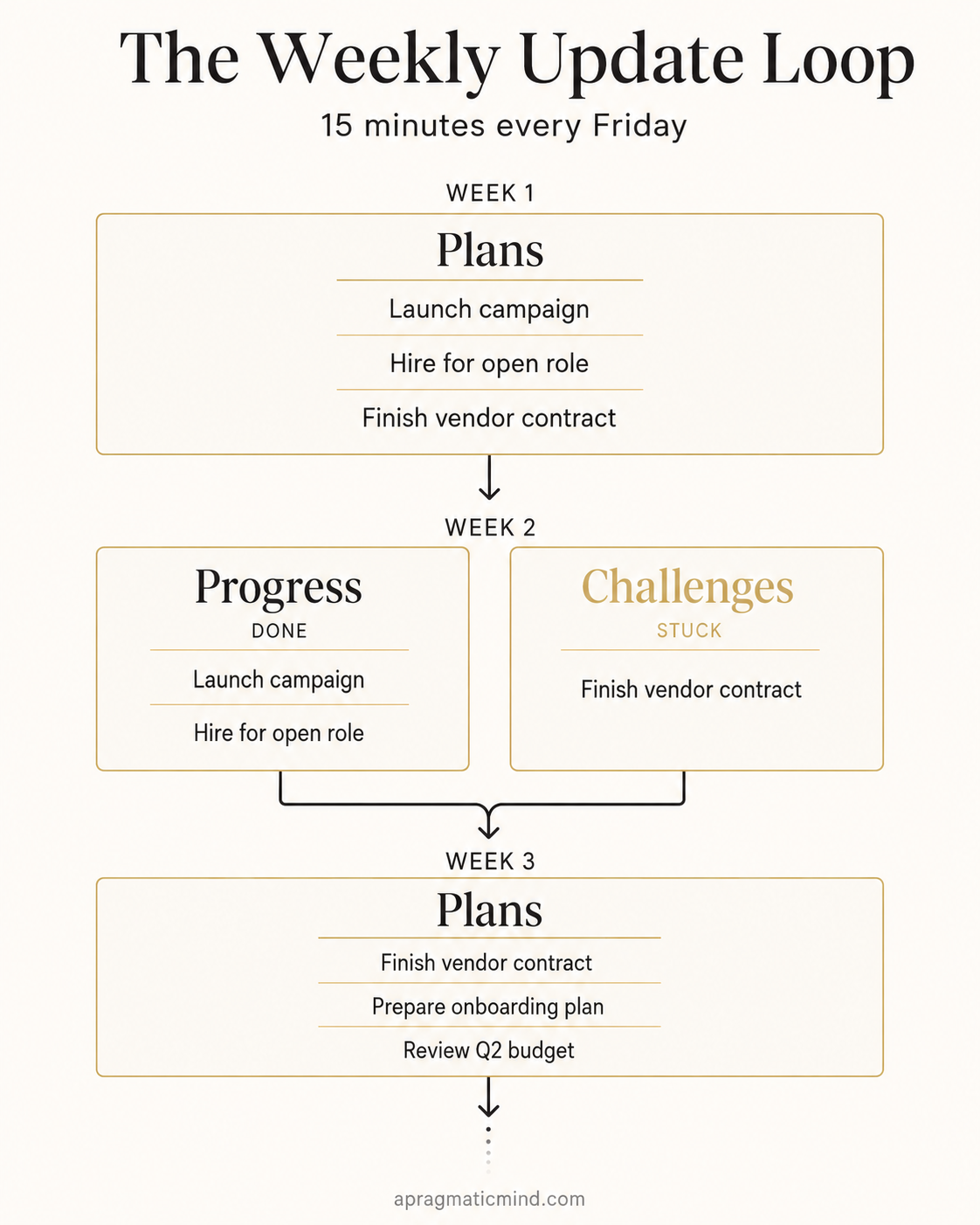
The Weekly Update Loop: How Plans Become Progress or Challenges
How a weekly update improves your visibility at work
The first thing it changed was my own clarity. Writing down what I did forces a question: was this actually the week I planned? Some Fridays, I look at my plans from the previous week and realize I spent four days on things that were not on that list. That is useful information. I want to notice when it happens.
The second thing: my boss started getting a short summary without having to ask for it. I send it over when it feels right, maybe every two weeks. No meeting needed. Five minutes to read.
And the VP question? The next time it happened, I had an answer ready. “Good progress on recruiting in [country], two strong candidates moving forward. One thing I could use help with: the vendor process is stuck in legal, and I think [name] might be able to move it along.” Two sentences. My VP walked away with two specific things to pass along.
The PPP method: Progress, Plans, Problems
What I have been describing has a name. It is called PPP: Progress, Plans, Problems. I did not know that when I started doing it at the startup. I only learned later that Google used a version of this from its early days (an engineer named Larry Schwimmer built an internal tool called “Snippets” around 1999). Skype, Facebook, and Palantir adopted similar systems.
Teresa Amabile and Steven Kramer at Harvard Business School studied nearly 12,000 diary entries from 238 employees across 7 companies. Their finding, published in The Progress Principle (Amabile & Kramer, 2011): the strongest driver of motivation at work is the feeling of making progress in meaningful work. Writing down what you accomplished is one of the simplest ways to give yourself that signal.
The difference between what those companies did and what I do: they rolled it out as an organizational process. I do it for myself, alone, in a Word document that nobody asked me to create. You do not need anyone’s permission or buy-in. You do not need a special tool. Open a document this Friday, write down what you did this week, where you got stuck, and what is next. It takes 15 minutes. By week four, you will not want to skip it.
I have since started using the same format with my team.
The weekly update captures what happened. For the ongoing back-and-forth with individual colleagues, I use a different format: a shared running document per person. I describe how that works in Why I keep a shared document for every person I work with.
Sources and further reading
Amabile, T. M. & Kramer, S. J. (2011). The Progress Principle: Using Small Wins to Ignite Joy, Engagement, and Creativity at Work. Harvard Business Review Press. Summary: [The Power of Small Wins (HBR)](https://hbr.org/2011/05/the-power-of-small-wins)
Schwimmer, L. / Google Snippets: [A Simple Productivity Secret From Google's Early Days (Inc.)](https://www.inc.com/jessica-stillman/a-simple-productivity-tip-from-googles-early-days.html)
PPP Method: [Progress, Plans, Problems (Wikipedia)](https://en.wikipedia.org/wiki/Progress,_plans,_problems)
Seedcamp (2025). [From PPP to (p)PPP: A Guide to Weekly Reporting](https://seedcamp.com/views/from-ppp-to-pppp-a-guide-to-weekly-reporting-2/)
